On 17 August, Google Ads smart bidding started holding budget-limited campaigns to the target you set instead of beating it. Set a Target CPA of $10 while the campaign has been quietly delivering $5, and it’ll now drift toward the $10 you asked for. Google won’t change your targets or your budgets for you. The accounts about to feel this hardest are the ones where that target was never worked out from the business.
Content Overview
What changed on 17 August
The change applies to campaigns carrying a Limited by budget status while running a target-based bid strategy, which means Target CPA or Target ROAS. Those campaigns used to be able to overperform their target, and their results moved around whenever you adjusted the budget. They now perform more consistently toward the target you set, including when the budget changes.
That $10 against $5 is Google’s own worked example. Their wording is that the campaign will now deliver closer to $10.
Search, Shopping, Performance Max, Demand Gen, Display, Hotel and Travel campaigns are all in scope, along with Search Ads 360 and Display & Video 360. App campaigns, Video reach and Video view campaigns aren’t affected.
Google will not adjust your targets or budgets for you. The Bid Target Adjustment Tool is where you do that yourself. You’ll find it behind the “Review your campaign targets” banner at the top of the account. The other route is Campaigns, then the gear icon beside the campaign, then Bidding, then Review campaigns.
Search Ads 360 users get a “Review bid strategies” banner instead. Notifications went to any advertiser with a campaign limited by budget on an affected strategy in the last 12 months. Across the accounts we manage, that was nearly all of them.
For most small accounts, limited by budget is the normal state
Read Google’s wording and the status sounds like an occasional warning you’d clear up on a Tuesday. Across the accounts we manage, it’s closer to a permanent condition. The budget is set by what the business can afford each month, not by what the auction would take. So the campaign spends to its cap most days of the year.
A change scoped to budget-limited campaigns is a change scoped to small advertisers. Accounts with real headroom rarely hold that status for long, because someone lifts the budget.
It also lands on the accounts least likely to have anyone in them day to day. Spend $4,000 a month, open the account once a month, and the target you set 18 months ago is still running the campaign. That’s the trade you make when handing bidding over. We picked it apart in whether to use automated Google Ads features or keep control.
The over-performance was never a plan
A campaign coming in at half its target CPA looks like the bidding system doing you a favour. Usually it’s a target set loosely against a budget too small to ever reach it.
When the money runs out well before the auction gets expensive, the system buys the cheapest conversions available and then stops. The $10 you authorised never got tested, because the budget was gone at $5. That reported number described your budget cap, not a decision you made.
Nobody interrogates a CPA that comes in at half target. It reports beautifully, the board nods, and the account gets left alone precisely because the number looks good.
What’s disappearing is a subsidy that came from a target nobody had connected to the business. The reported CPA in plenty of accounts is about to rise with nothing changing about the products, the market or the ads. It’ll read as a performance drop in your September report. It also lands alongside everything else pushing costs up, which we covered in why Google Ads conversion rates are sliding in 2026.
Work out the number your business actually needs
Your target CPA is the most you can pay for a conversion and still make money on it. That comes out of your own numbers. The dashboard can’t hand it to you, because it doesn’t know your margin.
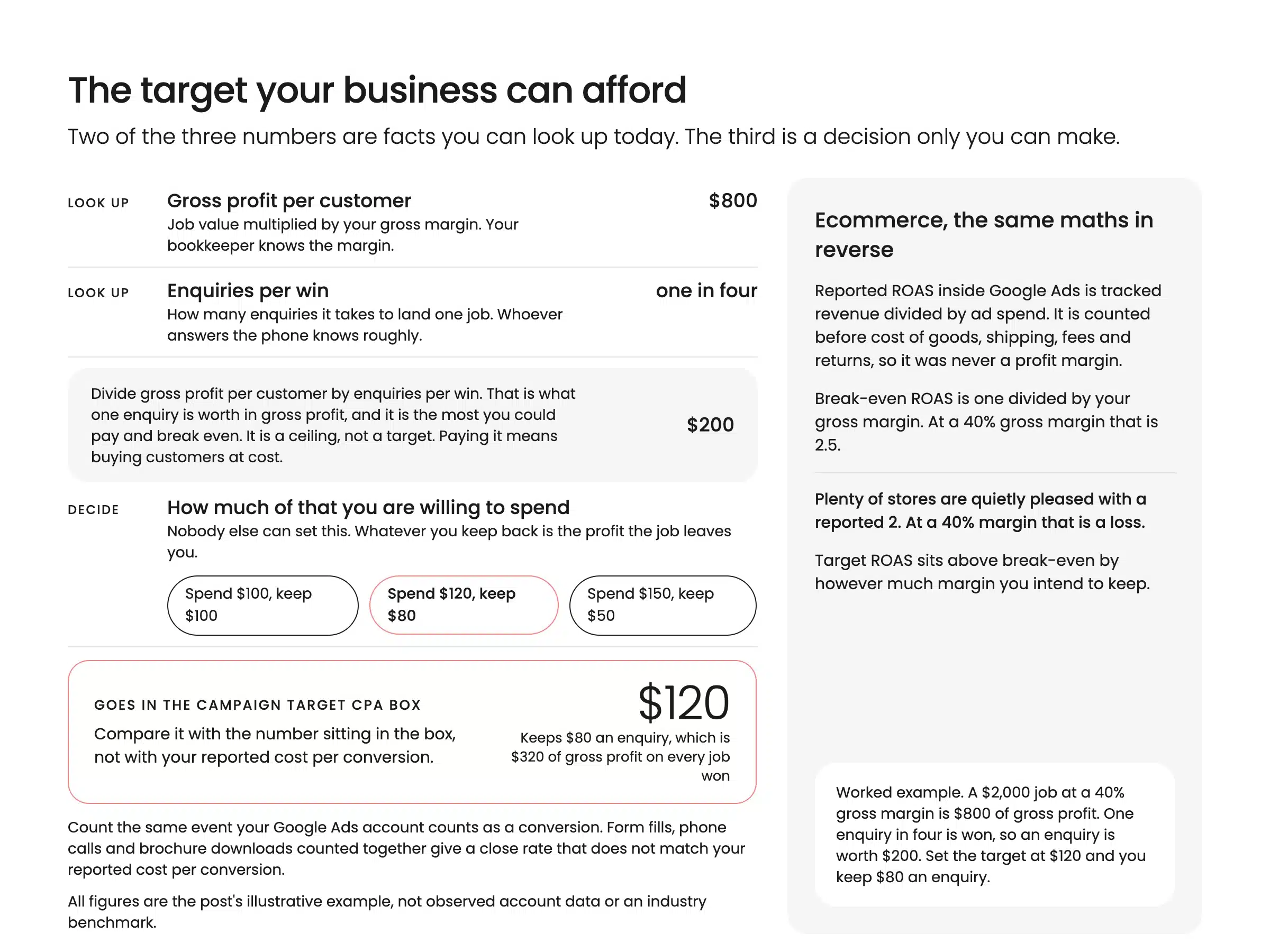
It takes three numbers: gross profit per customer, enquiries per win, and the share of that profit you’re willing to spend.
Say a typical job is $2,000 at a 40% gross margin, so $800 before overheads. If one enquiry in four turns into a job, each enquiry is worth $200 of gross profit. A target CPA of $200 means you’re buying customers at cost. Set it at $120 and you keep $80 an enquiry, which is $320 on every job you win.
Ecommerce runs the same maths in reverse. Reported ROAS inside Google Ads is revenue divided by ad spend, before cost of goods, shipping, fees and returns. It’s a media efficiency number, and it was never your profit margin.
On a 40% gross margin you break even at a ROAS of 2.5. Plenty of stores are quietly pleased with a reported 2. Google Shopping sharpens that again, because margin swings by product while one target sits across the lot of them.
Whoever owns the P&L already has these numbers. Your bookkeeper knows the gross margin, and whoever answers the phone knows roughly how many enquiries become jobs. It’s a twenty minute conversation, and it’s the one most accounts have never had. It’s the first thing we do on any Google Ads management account we take over, before touching a single setting.
Your four options, and which one we’d pick
Google’s tool offers four responses and presents them as equally sensible. Which one is right for you depends on your margin and whether your budget can move.
Keep the target as it is. If you set that target from your own margin and you’ve got room to lift the budget, leave it alone and raise the budget instead. This is the scenario Google’s own guidance is written for. Your CPA holds steady while the volume grows.
Adjust the target to recent performance. One button moves your target to roughly what the campaign has been delivering. If the account has been profitable and steady for six months and you’ve no time for anything else this week, take it. That number came out of your budget cap, and applying it turns a constraint into a policy.
Set a custom target. If you’ve done the margin maths and the answer sits somewhere between the old target and recent performance, type that number in. For most SME accounts we’d pick this one. It’s the only option where the number in the box came from your business.
Switch to Maximize conversions or Maximize conversion value. These spend the full budget with no target at all, so CPA and ROAS then move with the budget and the auction. If your budget is fixed, your margins are comfortable and someone reviews the account weekly, this is defensible and often the highest-volume choice. If nobody’s reviewing it weekly, don’t. You’ve removed the only guardrail the campaign had.
When the budget genuinely can’t move
Google’s answer to a budget-limited campaign is to raise the budget. Their guidance is to keep the daily budget comfortably above average daily spend, and to check the Recommendations page for forecasts. Wait one or two conversion cycles before judging an increase. Sound advice, if you have the money.
Plenty of Australian SMEs don’t. The ad budget is a line in a cash flow forecast that also carries wages and stock. No bidding change makes it bigger.
With a fixed budget you’re choosing between fewer conversions at a target you can defend, and full spend at whatever the auction charges. We’d take the first, then make the budget work harder by narrowing where it goes.
Cut the campaigns and products that can’t hit your number. Tighten the geography to where you actually service, and clean up the negatives. That’s usually worth more than the target itself, and it’s the ground we cover in how to improve your Google Ads ROI.
If your total marketing spend is under $5,000 a month, the split across channels matters more than any of this. We’ve set out what to do with your first $5k a month in marketing.
The number you never chose
This change only hurts in one situation: the CPA you’d been reporting was a number you never chose. Now the campaign will chase what you asked for, and you’re about to find out what you were asking for.
If your target came from your margin and your close rate, there’s nothing here to be nervous about. Check it against this year’s costs, apply it, move on. Everyone else has a decision to make in the next few weeks. The Bid Target Adjustment Tool is where you make it. Leave it, and the change makes it for you, at whatever target you typed in and forgot about.
If you don’t know what your CPA or ROAS should be, that’s a conversation about your business, not a setting in an ad account. Come and have a chat with us and we’ll work the number out with you, then set the target to match it.

Zac Fitzpatrick
PPC Service Lead