
On 12 November Meta switched on a new pixel setting for Australian advertisers. It’s called “Measure conversions on customer devices”, it lets Meta credit your ads with sales it couldn’t link to them before, and nobody had to opt in.
For Meta, it’s close to the perfect change. Your ads start looking better, and Meta doesn’t have to say much about why. Ads Manager can show more purchases and a better return on ad spend while your store sells exactly the same amount.
It doesn’t always do even that. Meta says the setting only works on sites where customers log in, but the toggle doesn’t check. We’ve seen it switched on for a home builder’s website that has no customer login at all.
Content Overview
What Meta’s new pixel setting does
Say someone sees your ad for a lamp on Instagram, then buys it on your website two days later. Your pixel tells Meta a sale happened. Meta then has to work out whether the person who bought is the same person who saw the ad, so it can credit your campaign.
Until now Meta has done that with cookies, the tracking code in your ad link and, if you use advanced matching, a scrambled copy of the customer’s email. When those clues go missing, and they often do because of browser privacy settings, ad blockers and people switching devices, Meta can’t connect the sale to the ad. The sale is still in your store. Ads Manager just doesn’t count it as coming from Meta.
The new setting gives Meta another way to make that connection. In Meta’s words, the match now happens on the shopper’s own device, “where both the ad view and the purchase are present”, using information the customer has already given you, like their email. Meta then only gets told that a sale happened and which campaign gets the credit.
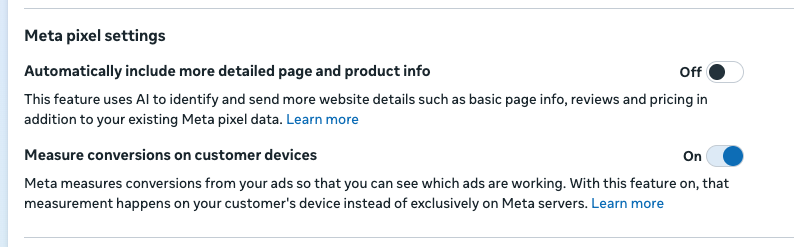 The setting in Meta Events Manager, switched on by default.
So Meta can now credit some sales to your ads that it couldn’t before.
How your ads can look better with no extra sales
Here’s a made-up store to show how that plays out.
Before 12 November, the store took 100 online orders a week. Ads Manager credited 40 of them to Meta ads.
After 12 November, the store still takes 100 orders a week. Same products, same prices, same ads. But Ads Manager now credits 46 of them to Meta.
| Store orders | Orders Meta credits to ads | |
|---|---|---|
| Before 12 Nov | 100 | 40 |
| After 12 Nov | 100 | 46 |
Nothing changed in the business. The return on ad spend in Ads Manager just went up by 15%. If you didn’t know about the setting, you’d think your ads had a great week.
Those numbers are only an illustration. Meta hasn’t said how much difference the setting makes, and it will vary by business. Some stores won’t see any change at all.
What Meta hasn’t explained about the setting
Meta has explained what the setting is meant to do. It hasn’t explained how the shopper’s device knows they saw your ad, how often the check runs, or roughly how many extra sales it adds.
There are a few other things Meta hasn’t said yet:
- whether these extra sales feed into how Meta bids and finds buyers, or only show up in reports
- whether the sale values come through, which affects your return on ad spend, or only the count
- whether leads count too, since Meta’s examples only mention purchases
Meta also says the setting only works if your website makes people log in. Its help page says your site “must require people to log in to an account using an email address or mobile phone number”. That rules out a lot of Australian small businesses, from lead-gen sites to online stores with guest checkout. But the toggle doesn’t tell you whether your site qualifies. We’ve seen it switched on for a home builder’s website that has no customer login at all.
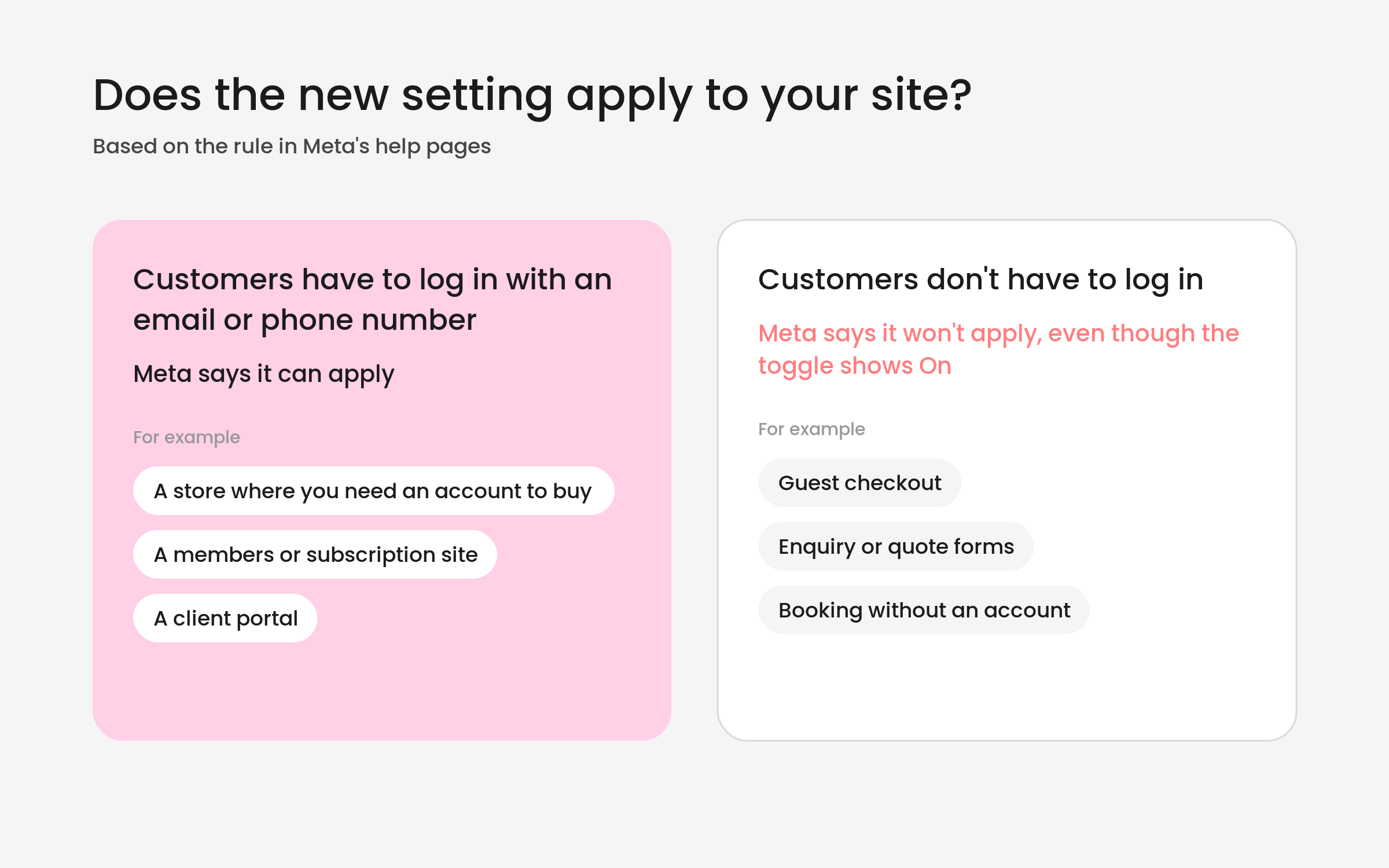
So the setting can be on and doing nothing, or on and adding sales Meta can’t fully explain. Either way, you’re taking Meta’s word for it.
If you already use advanced matching, the new setting feels like a wider version of the same thing. Our guess is it will mostly pick up the sales advanced matching misses, like someone who bought with a different email from the one on their Facebook account.
Why ad platforms claim more sales than you made
Meta has long argued that standard reporting undercounts what its ads do. Nobody outside your business can tell you whether that’s true for your account. And Meta isn’t the only one counting. Google Ads, your email platform and Meta each credit themselves with the sales they think they influenced, and they often claim the same sale. If you added up what every platform says it drove, it would usually come to more than your store took.
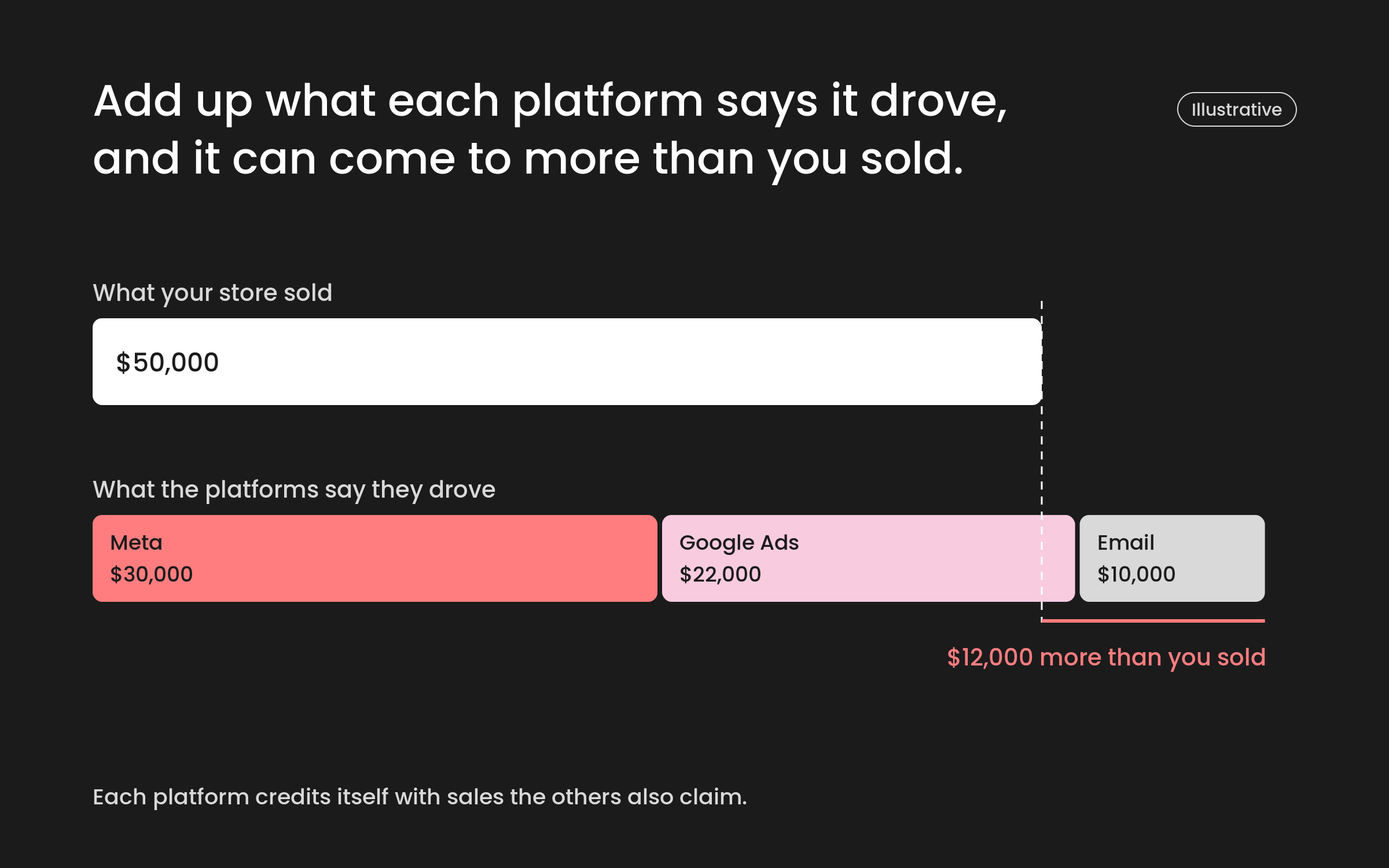
That’s not a reason to ignore platform reporting. It’s useful for comparing one campaign with another inside the same platform. It just can’t be the final word on how your marketing is going. Your total sales, your new customers and your bank account are what tell you that, and Meta’s new setting doesn’t touch any of them.
If you’re clear on what each platform is counting and you treat your store’s performance as the main measure, this change is easy to live with.
What to check in your Meta account this week
- Find the setting. In Events Manager, open your pixel and go to Settings. “Measure conversions on customer devices” sits under Meta pixel settings. Most businesses can leave it on. Just make it a decision, not a default.
- Check whether your site has a customer login. If it doesn’t, Meta says the setting won’t apply, whatever the toggle shows.
- Mark 12 November in your reports. Anyone comparing December with November, or with last December, should know the counting changed partway through.
- Compare Meta with your store every week. Put Meta’s reported purchases next to your actual orders, ideally with new customers split out, and watch the gap between them. If Meta’s number jumps and your orders don’t, you’ve found the setting at work.
- Don’t move budget on a jump your orders don’t back up. Especially heading into Boxing Day and the January sales.
Meta also hasn’t said whether these extra sales count towards the roughly 50 results a week an ad set needs to leave the learning phase. If they do, some ad sets could settle sooner with no change in what you sell. Worth keeping an eye on, but don’t read anything into it yet.
Privacy checks for health, finance and disability businesses
This setting works with information your customers have given you, like the email they log in with. In June the Australian Privacy Commissioner found that two health providers breached the Privacy Act through how they used tracking pixels, including Meta’s. The OAIC’s guidance on tracking pixels says due diligence on them “should not amount to a ‘set and forget’ approach”.
If your website reveals anything sensitive about the people using it, like a condition, a treatment or their financial situation, a setting that switched itself on is a good prompt to check what your pixel sends. This is general information, not legal advice. Talk to your privacy adviser before deciding what to keep on. If you’re a practice or clinic, our medical marketing page covers how we approach advertising in health.
Get help comparing Meta’s numbers with your sales
Want someone to put your Meta reporting next to your actual sales and tell you what’s working? Our Facebook ads team can help. Let’s have a look.
How this post was made
AI tools pulled and summarised the transcripts of five YouTube videos about this change, gathered written coverage, and helped with a first draft. A person at Distl chose the angle, checked the setting in Events Manager, checked Meta’s two help pages directly, and edited the draft. Facts were checked against Meta’s Business Help Centre and the OAIC’s tracking pixel guidance by Jack Headford. Author: Becca Humphrey.

Becca Humphrey
Paid Media Service Lead