For most of the time I’ve run Google Ads, the job was beating your competitors to the click. These days there’s a third player in the account, and it’s Google.
Google now makes a lot of the calls itself. It can write new headlines into your ads without asking. Its Target CPA bidding can leave part of your budget unspent if it doesn’t think it can hit your number. And the main alternative, Maximise conversions, spends the lot but can push your cost per lead well up.
Below I’ll go through what’s changed since Google Ads was mostly manual, what it looks like in a real account, and how we keep our clients’ goals ahead of Google’s.
Content Overview
How it used to work
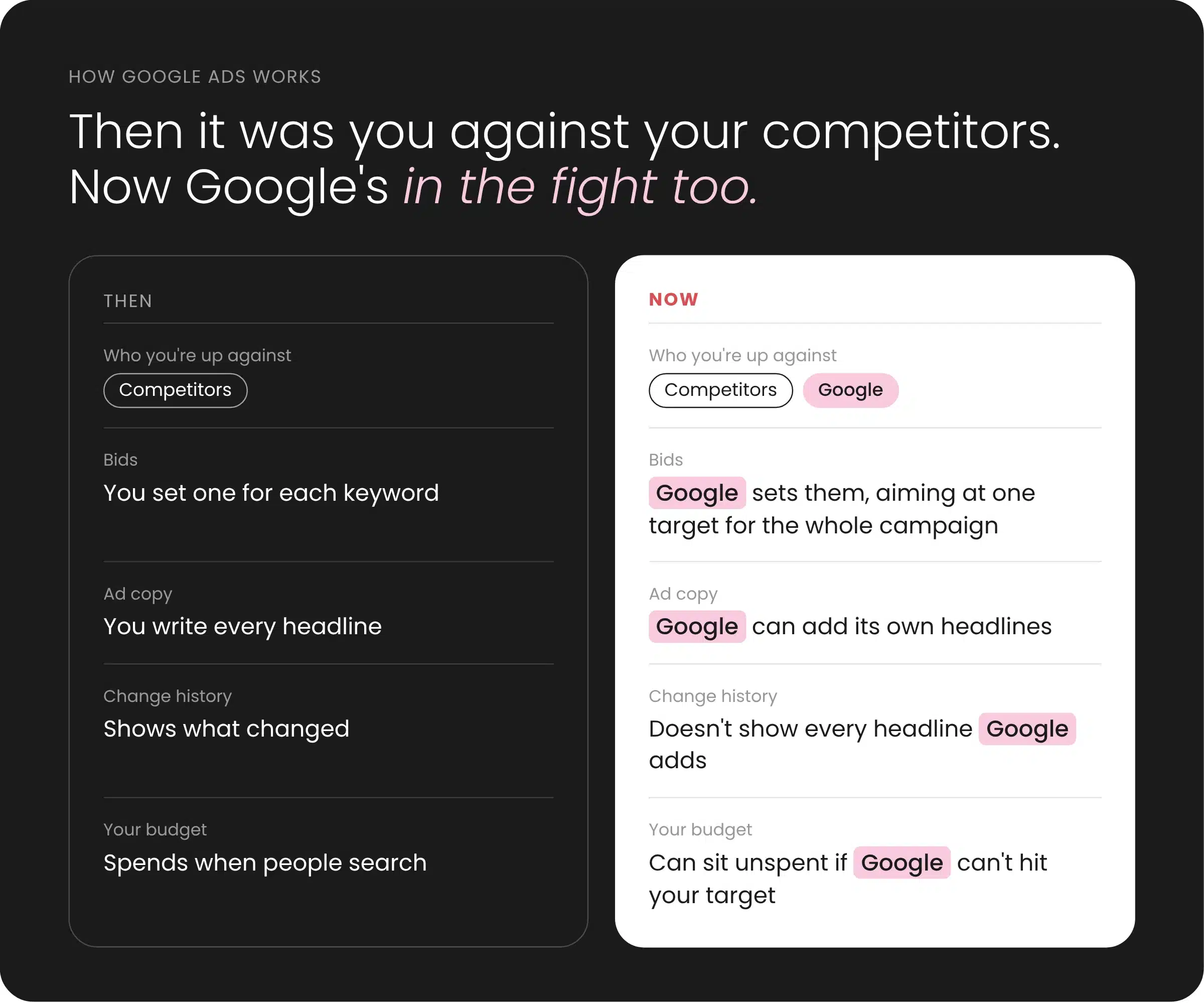
When Google Ads was manual you picked every keyword and set a max bid on each one. “plumber perth” might get $4, “emergency plumber perth” might get $7, because that person has water coming through the ceiling and wants someone now.
It took ages. But you knew what was running, what you’d pay for it and why. Google ran the auction and left your account alone.
How it works now
Automation was meant to take the grunt work off you, and a lot of it does. Smart bidding can weigh up things in real time that I never could. The catch is Google’s making a lot more of the calls now, and it has its own reasons for making them. It shows up in a few places.
Google’s writing ads for you
Google can now write headlines and descriptions and put them in your ads itself (it’s part of the AI Max setting, we’ve written about trialling AI Max campaigns if you’re weighing it up). We’ve caught headlines in live ads that we didn’t write and the client hadn’t seen. They weren’t in the change history either. The way we found them was a column in the asset report that says whether each asset came from you or from Google AI.
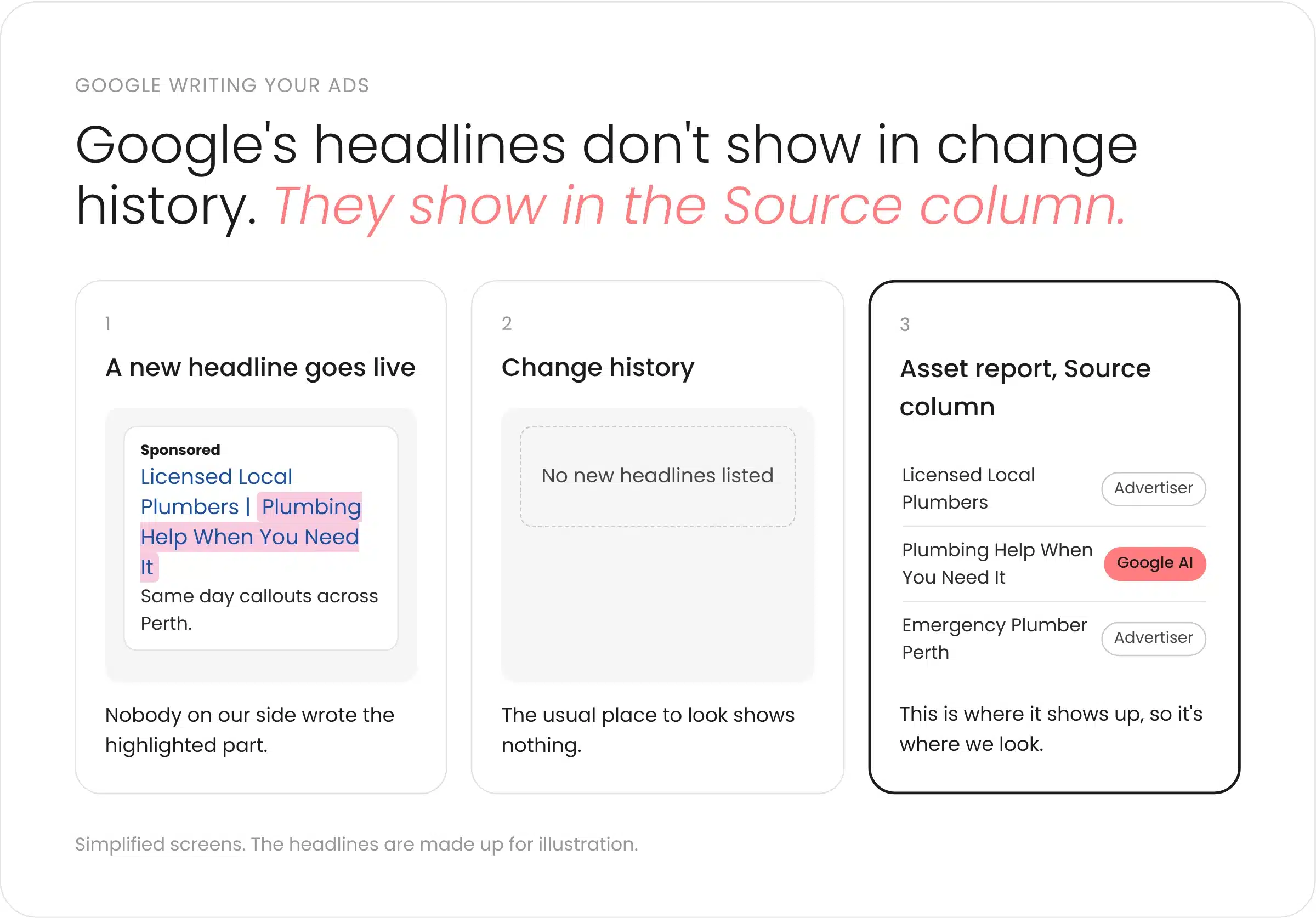
So that column’s where we look now. You don’t want a client spotting a headline before you do and asking where it came from.
Target CPA works differently now
Target CPA is where you tell Google what you’re happy to pay for a lead. It used to be more of a guide. Since August, Google holds budget-limited campaigns to your target instead of letting them beat it, Zac’s covered that change properly in Smart Bidding now hits your target.
What I’m seeing on top of that is if Google doesn’t think it can get leads at your number, it just doesn’t spend.
One client has a $1,600 monthly budget and a $100 cost per lead goal. Last month the account came in a bit under, at about $1,300. One search campaign already had its target at $140, above the goal to give it some room. Google’s recommendation was to take it to $202.
That campaign was losing about 70% of the impressions it could have had to ad rank, and under 9% to budget. So it had the money, the target was what held it back.
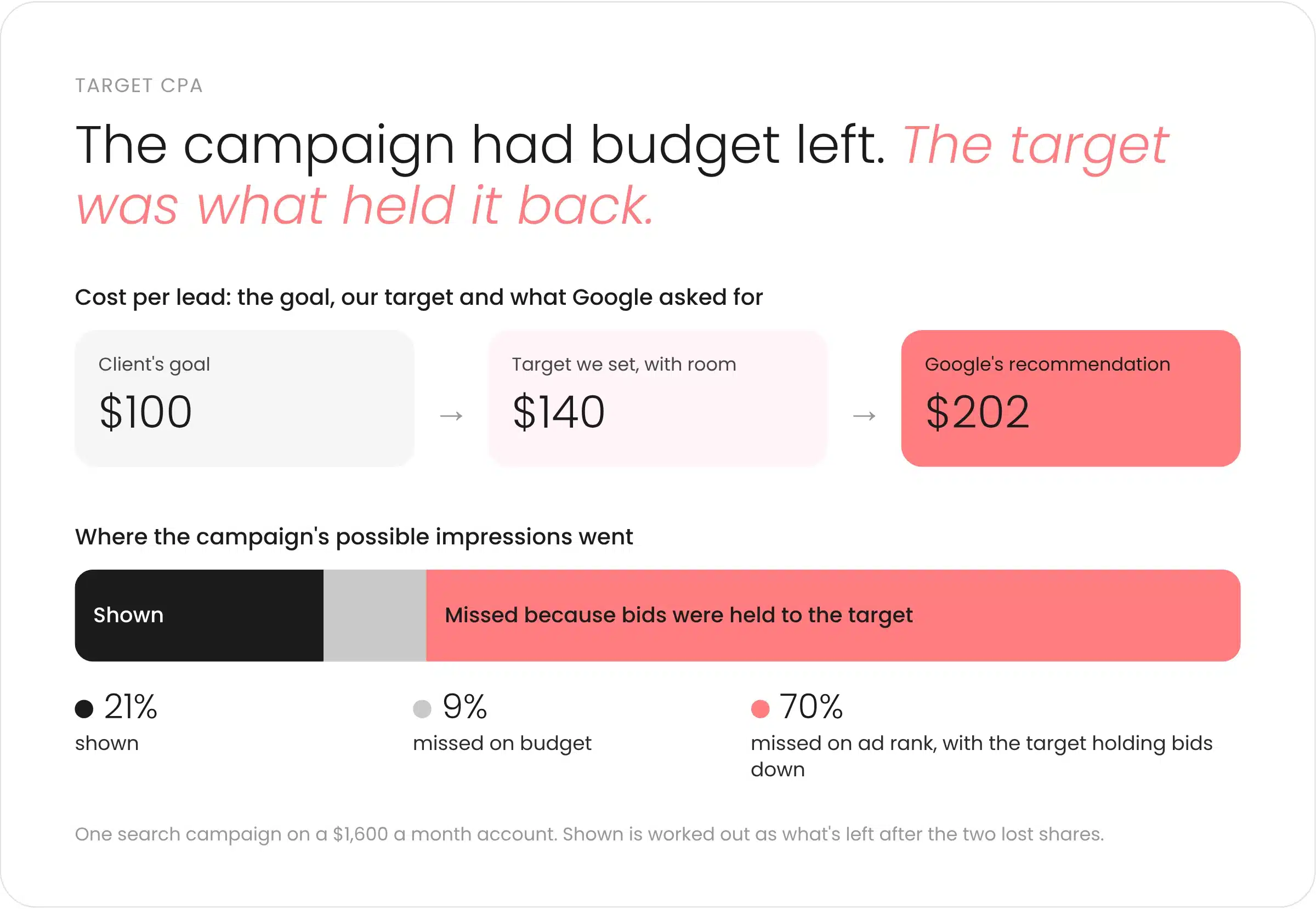
If I set it to $202, Google would spend $202 a lead and treat that as normal from then on. Only a few weeks earlier Google’s number was $140, and nothing about the business had changed. So I’m holding the target and testing instead, more on that below. We’ve seen the same pattern on other accounts.
And Maximise conversions goes the other way
The obvious fix is to take the target off and switch to Maximise conversions. We tested that on another account. It spent the full budget, but cost per lead went up a long way, so we moved it back to Target CPA. Cost per lead came back down, and the underspend came back with it.
So you end up picking between holding your cost per lead with budget sitting there, or spending it all at whatever price Google lands on.
If you’ve got a Target CPA campaign saying “Limited by budget” and you’re not sure if it’s the budget or the target, send us a message and we’ll have a look.
It’s a bit like going back to manual bidding
In a way it’s back where Google Ads started. Target CPA is a max bid again, just one for the whole campaign rather than one per keyword.
Which is worse really. Before, you could pay $7 for the emergency search and $4 for someone browsing. Now one number covers every keyword in the campaign, however ready to buy the person is.
Underspending is worse than a pricey lead
Most people worry about cost per lead getting too high. For most of our clients underspending is the bigger problem.
If the full budget goes out and leads come in expensive, that’s a conversation about what’s going on and what we’re changing. If a month comes in at $500 of a $1,600 budget, it looks like nobody tried, even when the reason is a setting. And the client’s still paying their agency fee that month either way.
Google’s recommendations aren’t neutral either, Google makes more when you spend more (we wrote about who’s paying for Google’s AI last week). Sometimes raising the target is the right move. I just check the data before I take Google’s word for it.
Taking control back
I’m not against automation. Smart bidding works well when it’s got good data and some limits around it. What I don’t want is to hand Google the wheel and assume it’s heading where the client wants to go.
A client’s brief is pretty simple when you strip it back. Here’s our money, get us as many good leads as you can. Google’s goal is a bit different, it does better when you spend more. My job is to sit on the client’s side of that, and keep a person making the calls Google would happily make for them.
That starts with knowing what’s running in an account and who put it there. If Google’s added a headline, I want to find it before the client does and decide whether it stays.
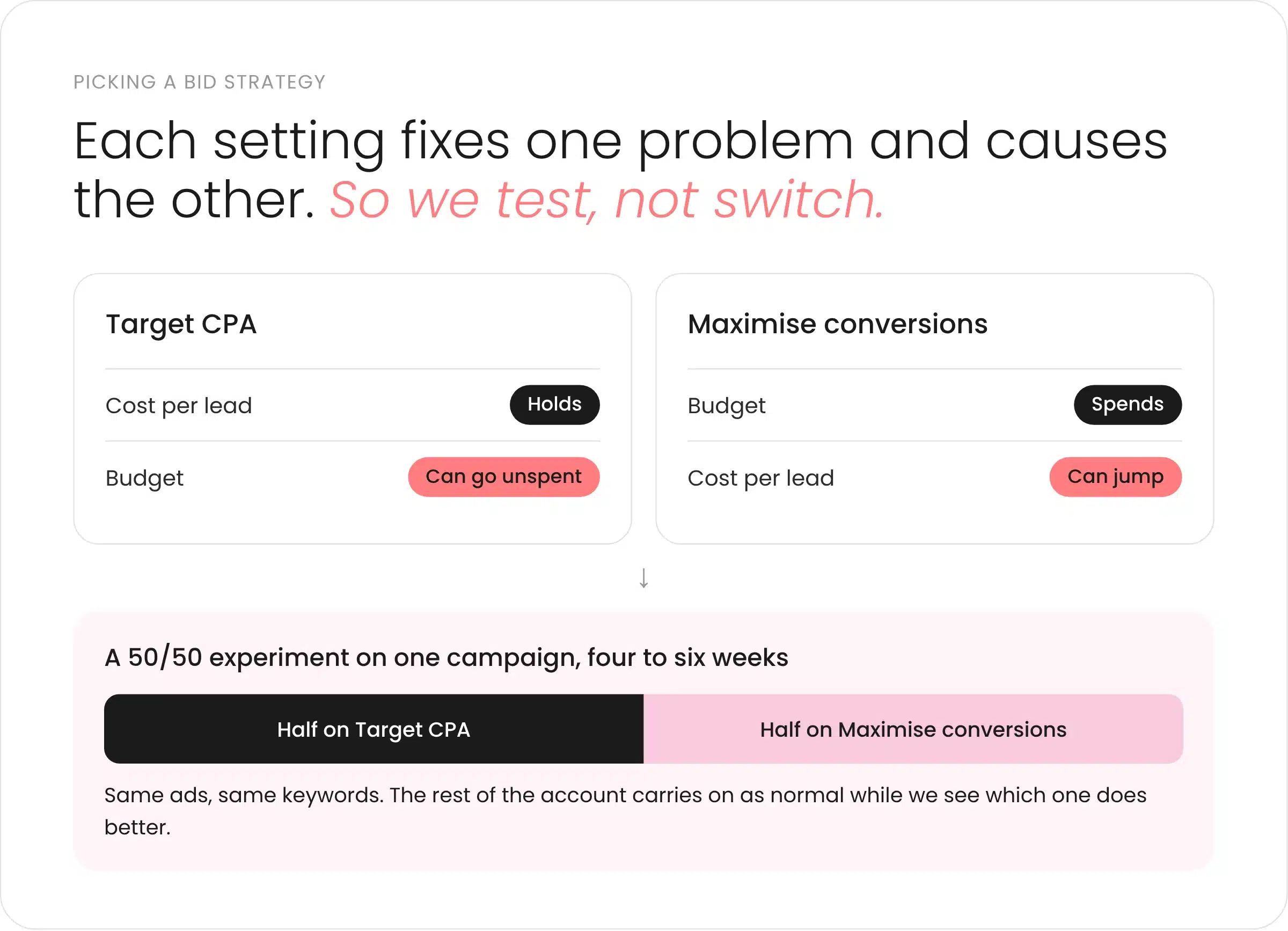
It also means being careful with changes. I’d rather test something on part of an account than flip the whole thing and hope. For the client above, I’m splitting one campaign between the two bid strategies to see what comes back, and leaving the campaign that’s working alone.
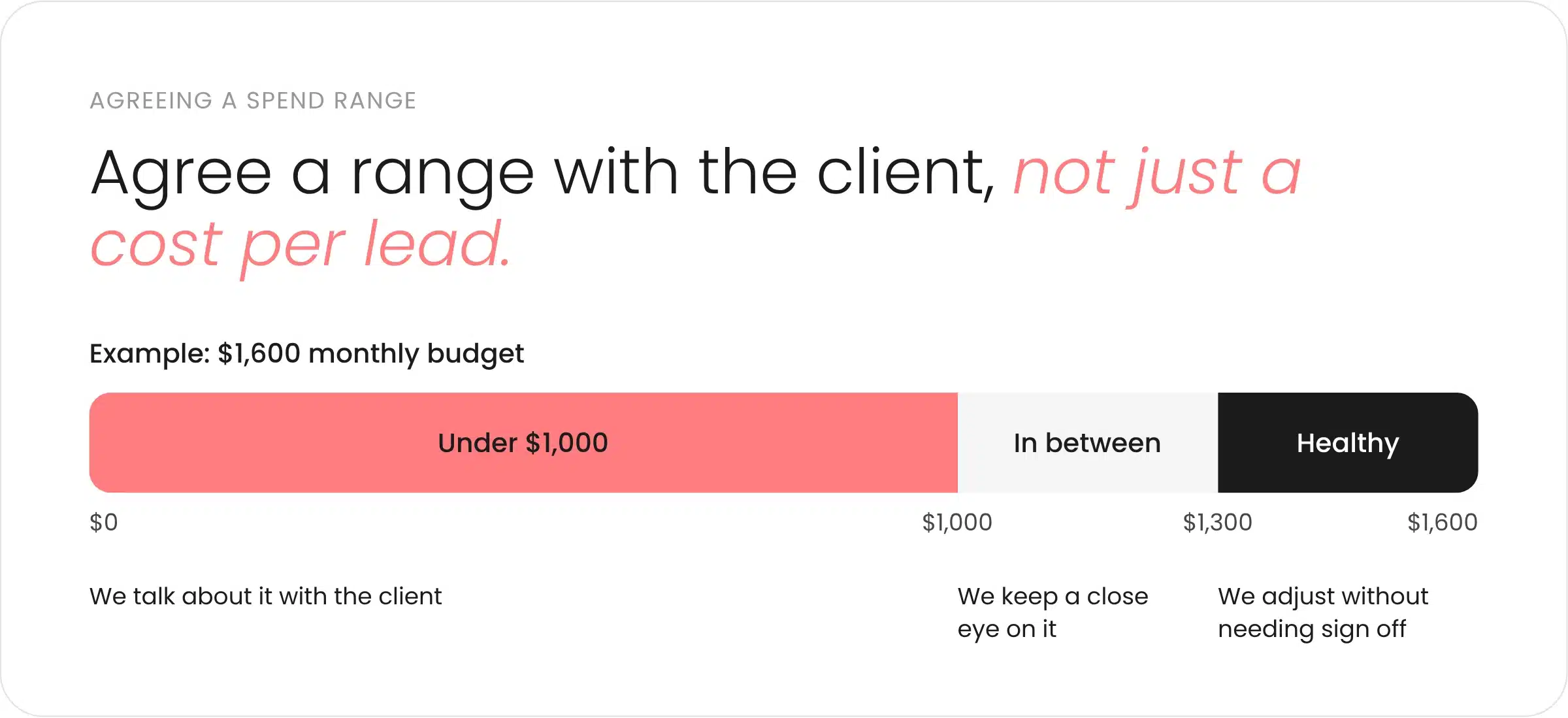
And it means agreeing with the client what good looks like, not just a cost per lead. Most targets aren’t built from sales data. Ours for this client came from three months of results plus a bit of buffer, which is normal. So alongside the target, we agree a spend range they’re comfortable with. For that client, $1,300 to $1,600 a month is healthy and well under $1,000 means we talk. That gives me room to make the call when Google moves the goalposts, without going back for sign off every time something shifts. If you want to work out your target properly from your margins, Zac’s post above walks through it.
Who this applies to
If you’re on Target CPA with a tight target and spending under about $5k a month, you’ll feel this most. Smaller accounts have less conversion data, so Google’s less sure of itself and more likely to hold back. Bigger accounts with good conversion tracking feel it less, though the AI-written headlines happen to everyone.
I don’t think this stops here. Google’s going to keep making more of the calls, and in a year it’ll probably look different again. We’ve never been fans of handing Google the whole account and checking in once a month, and that matters more now than it did.
If your account’s underspending, flipping between strategies or running ads you don’t recognise, talk to our Google Ads team. We’ll tell you what’s going on and what we’d do about it.
How this post was made
This started as a call with our account manager about a client account. AI tools turned the call transcript into an outline and first draft, the account manager reworked it, and I edited it and made the final call on what went in. The account figures were checked against the client’s Google Ads data, and the August bidding change against Google’s help documentation. Client names are left out. Written and signed off by Cassidy Abercrombie.

Cassidy Abercrombie
Senior PPC Specialist