You’ve got three versions of your next Instagram Reel. Same product, same visuals, but three different opening hooks. One opens on a trending audio clip, one on a question, one on a bold claim. Which one earns the most attention? You can’t post all three to your feed without annoying the audience you’ve worked hard to build.
That’s the job Instagram Trial Reels do. They let you share a Reel with people who don’t follow you first, so you can see what lands before it ever hits your feed.
The feature launched in December 2024 and Instagram has kept changing it. It has lowered the follower bar for professional accounts, added scheduling, and changed how automatic sharing works. So if you tried Trial Reels a year ago and moved on, the tool you dismissed isn’t the tool you’d be using today. Whether you run a Perth cafe, a Sydney consulting firm, or an e-commerce brand shipping nationwide, this is how to use them properly in 2026.
What Are Instagram Trial Reels?
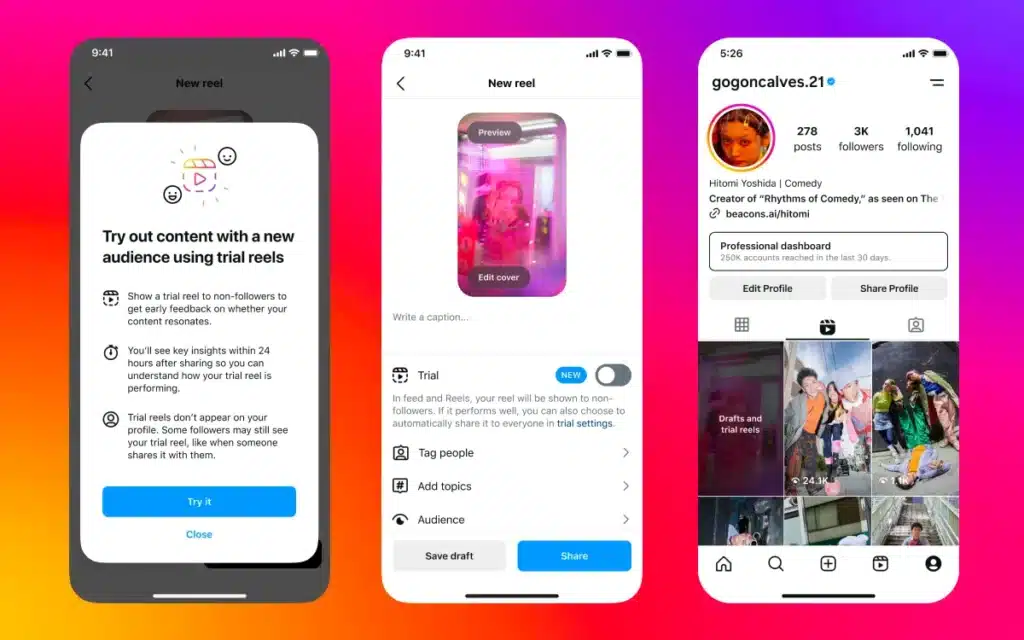
Instagram Trial Reels let you test a video with non-followers before your existing audience sees it. Think of it as a focus group built into the app: a sandbox where you can experiment without the result showing up on your grid.
When you publish a Trial Reel, Instagram shows it only to people who don’t follow you. Those viewers give you a cleaner read on your content, because they’re not watching out of loyalty. They’re watching because something in the first few seconds stopped the scroll.
Regular Reels hit your profile and your followers’ feeds the moment you post. Trial Reels stay hidden from your main audience while they’re being tested. Your Mum liking your Reel tells you nothing. A stranger watching it to the end tells you plenty. That separation is the whole point.
(Source: Instagram Creators)
What’s Changed With Trial Reels in 2026
If your knowledge of Trial Reels is from the 2025 rollout, a few things are worth catching up on.
Who can use them. Instagram’s help centre says you need a professional (Business or Creator) account, and that some creators without one have access while Instagram keeps testing the feature.
Auto-share still runs on early views. If you turn on “Share to everyone automatically”, Instagram shares the trial with your followers when it gets a lot of views within the first 72 hours. Insights arrive within 24 hours, and the setting carries over to every future trial until you change it.
You can schedule trials in advance. In April 2026, Instagram added scheduling for Trial Reels, the same way you’d schedule a normal post. You can line a test up for when your audience is most active, or stagger tests across time zones if you sell to more than one state.
Trials need new content. Instagram’s help centre now warns that a trial may get limited reach if it detects you’ve shared the same content before. Reposting an old Reel unchanged is no longer a reliable test.
There’s a limit on how many you can run. Instagram caps how many trials an account can post in a set period. It hasn’t published the number, but scheduling tools that publish through Instagram’s API report an error when an account reaches it. Treat trials as considered bets, not something you fire off ten times a day.
Who Can Use Trial Reels (Availability & Setup)
To use Trial Reels you need a professional (Business or Creator) account. Instagram says some creators without one also have access while it keeps testing the feature.
Finding it is simple. When you’re uploading a Reel, look for the “Trial” toggle before you share. If you have a professional account and still can’t see it, check Account Status in your settings for any restrictions.
How to Post a Trial Reel on Instagram (Step by Step)
Here’s the full process, from filming to deciding what to do with the result.
Step 1: Create your Reel
Film or upload your video the way you always would. Make it something new: Instagram may limit a trial’s reach if it detects you’ve shared the same content before. If you want to give an old idea another run, re-cut it with a new opening and new on-screen text. You’re showing this to cold viewers who’ve never heard of you, so it needs to earn attention on its own.
Step 2: Turn on “Trial” before you share
On the final screen before posting, open your audience settings and switch on “Share as Trial Reel.” This is the step people miss. Flip that toggle and the Reel goes into testing mode instead of live to your followers. Instagram clearly labels it as a trial so there’s no confusion about where it’s gone. If you want, you can also schedule it here to publish at a better time.

Step 3: Share and let it run
Once you share, the trial goes out to non-followers Instagram thinks might be interested. Insights appear within 24 hours. Trials can take longer to pick up views than a normal Reel, because Instagram is finding people who don’t know you yet, so give it a few days before you judge it. Resist the urge to refresh every hour.

Step 4: Check your results
To find your trial’s performance, go to your profile, open the Reels tab, and look for “Drafts and trial reels.” You’ll see views, likes, comments, shares and average watch time. Watch time and completion matter more than raw views here. A Reel that 500 people finish is a stronger signal than one 5,000 people bail on after two seconds.
Step 5: Decide what happens next
If the trial hit your benchmark, share it with your followers with confidence. Instagram gives you an auto-share option if you’d rather set it and forget it. Once it’s live on your grid, you can link related Reels together so anyone who finishes it moves straight to the next one. If it underperformed, that’s not a failure, it’s free feedback. Work out what didn’t land, adjust, and test again. The weak version never touched your main feed, which is exactly the point.
Why Trial Reels Are Worth It (Key Benefits)
Low-risk experimentation
Posting and hoping is a bad content strategy. Trial Reels let you test the risky ideas, the edgier brand voice, the product angle you’re not sure about, without gambling your feed aesthetic or your engagement rate on it. If it works, publish it. If it doesn’t, only strangers saw it.
Decisions backed by data
Reels account for a large and growing share of time spent on Instagram, so guessing your way through them is expensive. Trials give you real engagement numbers from unbiased viewers within a few days. Instagram ranks trials separately from your regular Reels, and your loyal followers aren’t there to inflate the numbers, so the read is a clean one. You’re deciding on genuine response, not vanity metrics.
A leaner content workflow
For a time-poor SME owner, this is the real win. Trials mean you only put effort into promoting ideas that have already proven themselves. You can also get more from the content you’ve already made by re-cutting an older Reel with a new opening and testing that as a trial. A straight repost risks limited reach. Less time on posts that flop, more time on the ones that move.
A cheaper pre-flight for paid
Running paid social on a tight budget? Test your creative organically as a trial first, find the winner, then put spend behind the video you already know performs, rather than paying to learn during the ad’s learning phase. Done right, it lifts your return on ad spend.
It’s the same logic we use when one shoot feeds both organic and paid. When we ran Hiyori’s organic and paid social, the same on-location shoots fed the Instagram feed and the ads across Meta and TikTok. In the first month the Meta campaign brought in 130 bookings at around $12 each, and on TikTok the same content reached 3.35 million impressions.
This works for awareness and traffic-style creative. Conversion ads aimed at people who already know you need a different approach, so don’t treat a trial result as a green light for bottom-of-funnel campaigns.
If you’re not sure where trials fit against your paid activity, that’s the kind of thing our social media marketing team maps out for clients every week.
Best Practices for Trial Reels
Start with a clear goal
Decide what you’re testing before you film. Hook styles? Audio tracks? A product angle? Write down the one metric that matters most for this test. That clarity guides both the creative and how you read the result. New toys are fun, but a test without a hypothesis is just posting with extra steps.
Change one thing at a time
Clean testing means isolating the variable. Keep the video identical and swap only the hook. Or keep the visuals and change only the audio. That way you know exactly what drove the difference. If you change five things at once, a win tells you nothing you can repeat.
Lead with a strong hook
Trials go to cold audiences with zero loyalty, so your first three seconds have to work harder than usual. These people don’t know your brand, which is oddly freeing. Push a little past your usual comfort zone. Bold text, a striking visual, an intriguing question, whatever stops the thumb.
One technical note if you’re reworking old content as a trial: Instagram says a trial may get limited reach if it detects you’ve shared the same content before. Change the opening clip and the on-screen text at the very least, and treat it as a new Reel.
Watch the right metrics
Match the metric to the goal. Chasing reach? Look at views and accounts reached. Building engagement? Prioritise shares, saves and comments. And don’t sleep on average watch time. A modest view count with high completion often beats a viral-looking video people abandon early.
Don’t overdo it
Because Instagram caps how many trials you can run, reserve them for content where the stakes are real. Hit the limit and you can’t post more trials until it resets. Trials are your insurance policy for big bets, not a replacement for just posting.
Learn and iterate
Every trial teaches you something. Note what worked after each one. If version A doubled shares over version B, dig into why. Over time the patterns show up: maybe trending audio reliably lifts watch time, or demos beat lifestyle content for your audience. That knowledge base is where the real edge is, and it’s what makes a social media strategy get sharper every month instead of starting from scratch.
Trial Reels FAQs
How do trial reels work?
You turn on the “Trial” toggle before you share a Reel, and Instagram shows it only to people who don’t follow you. Insights appear within 24 hours. If it performs well, you share it to everyone, or let Instagram do it automatically. Your followers don’t see it in their feed or Reels tab while it’s a trial.
How many followers do you need for trial reels?
Instagram doesn’t set a follower minimum in its help centre. What you need is a professional (Business or Creator) account, and some creators without one have access while Instagram tests the feature. If you have one and can’t see the toggle, check Account Status in your settings.
How do I turn a trial reel into a normal reel?
Go to your profile and open your Reels. Your trials sit alongside your drafts. Tap the trial, then choose “Share to everyone”. It moves to your main grid and Reels tab and can show in your followers’ feeds, the same as any other Reel. This is also how you make a trial reel public or post it to your main feed.
Can Instagram share a trial reel to my followers automatically?
Yes. Turn on “Share to everyone automatically” in the trial settings before you share. Instagram will share the Reel with your followers if it gets a lot of views within the first 72 hours. The setting applies to every trial after that until you switch it off.
How long do trial reels last?
There’s no set end date. A trial stays a trial until you share it to everyone or delete it, and you can share it at any time. Insights arrive within 24 hours, but trials can be slow to build views because they’re going to strangers, so give it a few days before you decide.
How many trial reels can you post in a day?
Instagram limits how many trials an account can post in a set period but hasn’t published the number. If you reach it, you’ll be stopped from posting more trials until it resets. In practice, save trials for content where the result will change what you do next.
Can my followers see my trial reels?
Not in their feed or Reels tab, and not on your profile. A follower can still come across one if someone sends it to them in a direct message, on a page that groups Reels by the same audio, or in search engine results.
How do I see my trial reels and their results?
Go to your profile, open the Reels tab, and look for “Drafts and trial reels.” Tap a trial to see its views, likes, comments, shares and watch time.
Can I schedule a trial reel?
Yes. Since April 2026 you can schedule a trial the same way you schedule a normal Reel, so it goes out when non-followers in your market are most active.
Do trial reels affect my other reels?
No. Instagram ranks trials separately, so a weak trial won’t drag down your regular Reels. That’s the design: test freely, and only your proven content reaches your feed.
Do I need to make two versions of every post now?
No. Trials are a tool, not a rule. If you’re already struggling to post regularly, skip them for now. Save them for content where the stakes are higher: a product launch, a bold creative departure, or something you’re considering putting ad spend behind. Everyday posts can go straight to your feed.
Will trial reels help me grow my followers?
Indirectly, yes. Because trials show to non-followers, a strong one can win you followers during the test. The bigger effect comes from only posting proven content to your main feed.
Trial Reels: Test, Learn, Grow Smarter
Trial Reels give you a built-in focus group, on call whenever you need to validate an idea before it goes public. Used well, they take the guesswork out of your content and let you post the stuff you already know will land.
Your time is worth more than that. Let trials do the heavy lifting of finding what your audience actually wants, then give them exactly that. As a social media marketing agency in Perth, we’ve watched this feature turn hopeful content calendars into strategic ones.
Want a content strategy that uses tools like Trial Reels properly instead of just chasing trends? Talk to our team and let’s build you something.